The Y2K aesthetic is more than a trend—it’s a full-blown design movement. From metallic chrome finishes to holographic gradients and bubble letters, the early 2000s visual language is dominating social media, branding, and digital marketing in 2026.
But here’s the problem: finding the right Y2K elements in Canva’s massive library can feel overwhelming. That’s where Canva element codes come in. These secret set: codes unlock curated collections of Y2K stickers, shapes, and illustrations instantly—no endless scrolling required.
In this guide, you’ll get 50+ verified Y2K Canva element codes organized by category, plus pro tips on how to use them for maximum impact.
What Are Canva Element Codes?
Canva element codes are unique identifiers (formatted as set:XXXXXXXXXXX) that pull up specific curated collections when pasted into Canva’s Elements search bar. Think of them as backstage passes to hidden design libraries that would otherwise take hours to find manually.
How to use them:
- Open any Canva design
- Click Elements in the left sidebar
- Paste the code (e.g.,
set:nAEm9LnE1HE) into the search bar - Press Enter—the entire set appears instantly
Best Y2K Canva Element Codes by Category
Y2K Stickers & Icons
Stickers are the backbone of any Y2K design. These sets feature chrome finishes, gradient fills, and that unmistakable early-2000s energy.
| Element Set | Code |
|---|---|
| Retro Y2K Stickers | set:nAEm9LnE1HE |
| Retro Design Y2K Stickers | set:nAFV8aJByoM |
| Y2K Food Stickers | set:nAExRQpJjbQ |
| Gradient Sticker Design | set:nAExRQpJjbQ |
| Stroke Y2K Icons | set:nAFEPSMyYfo |
| Gradient Y2K Icons | set:nAFgapvG3XE |
| Animated Y2K Stickers | set:nAEm9LnE1HE |
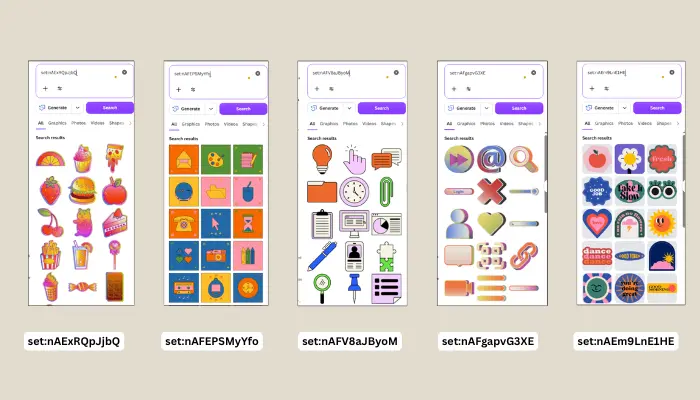
Pro Tip: Layer gradient stickers over solid backgrounds and add a subtle drop shadow for that classic “sticker peel” effect.
Y2K Shapes & Abstract Elements
Brutalist shapes, chrome blobs, and geometric abstractions define the Y2K shape language. Use these for backgrounds, frames, or focal points.
Table
| Element Set | Code |
|---|---|
| Futuristic Y2K Brutalist Shapes | set:nAFZYpLQW2Y |
| Y2K Brutalist Abstract Shapes | set:nAFM1cBl880 |
| Y2K Brutalist Abstract Shapes (Alt) | set:nAFfHlN895M |
| Shiny Y2K Shapes and Elements | set:nAFhAEpwOfg |
| Geometric Y2K Icons | set:nAFEPSMyYfo |
| Chrome and Metal Y2K Elements | set:nAEYV5teqYg |
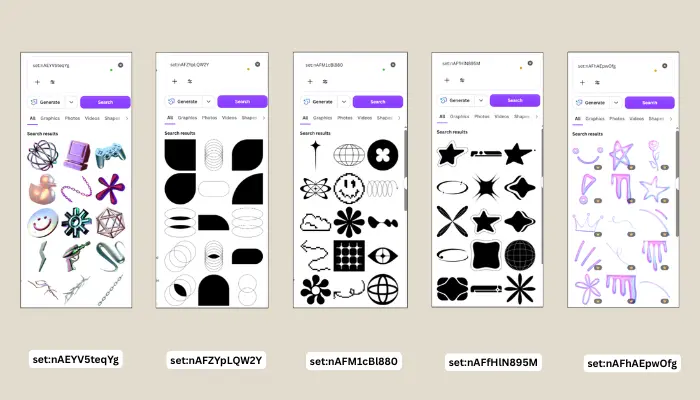
Design Hack: Combine chrome shapes with neon color palettes (#FF00FF, #00FFFF, #CCFF00) for authentic Y2K vibes.
3D Holographic Y2K Elements
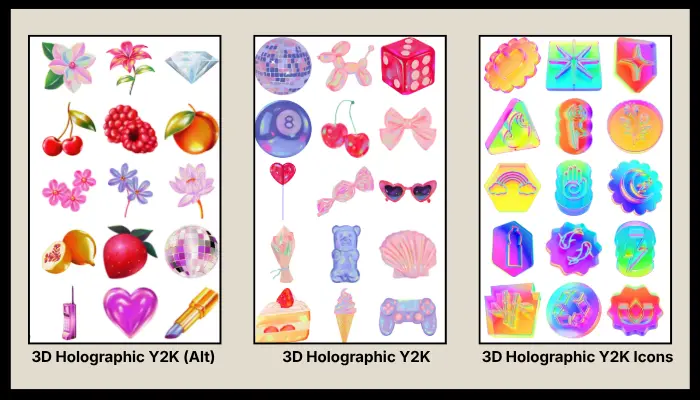
Nothing screams Y2K like holographic 3D renders. These elements add depth, dimension, and that futuristic “liquid metal” look to your designs.
Table
| Element Set | Code |
|---|---|
| 3D Holographic Y2K | set:nAFU5WnvxKs |
| 3D Holographic Y2K Icons | set:nAFKGhuGhPM |
| 3D Holographic Y2K (Alt) | set:nAE_EXl-3Zc |
| 3D Holographic Y2K (Alt 2) | set:nAFIU4kQVbQ |
| 3D Holographic Y2K (Alt 3) | set:nAEpaMtt4ec |
| 3D Holographic Geometric Shapes | set:nAE7qHQ4oGA |
| Dreamy Holographic Y2K Items | set:nAFU5WnvxKs |
| Gradient Chrome Y2K Elements | set:nAFIU4kQVbQ |
| Holographic 3D Surrealism | set:nAFxYd7ojXY |
Y2K Typography & Letter Sets
Custom lettering is essential for Y2K branding. These 3D and metallic letter sets let you build headlines that pop.
Table
| Element Set | Code |
|---|---|
| 3D Y2K Alphabet | set:nAFpb6MPYhs |
| 3D Metallic Bubble Y2K Letters | set:nAFq71YYvk8 |
| 3D Y2K Style Letters | set:nAFtdHbbbxE |
| Y2K Graffiti Typography | set:nAGgp0lAuX8 |
Pro Tip: Use bubble letters for headlines and pair them with thin, futuristic sans-serif fonts like Orbitron or Rajdhani for body text.
Y2K Backgrounds & Patterns
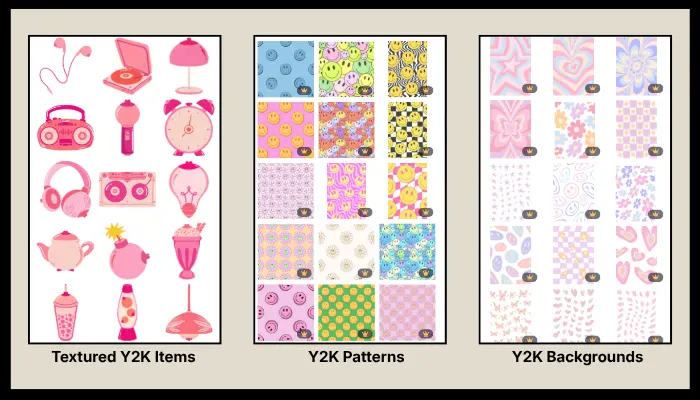
Every great Y2K design starts with the right foundation. These background sets provide instant atmosphere.
Table
| Element Set | Code |
|---|---|
| Y2K Backgrounds | set:nAFp6wXns8w |
| Y2K Patterns | set:nAFf6NIuUzc |
| Textured Y2K Items | set:nAFAczmSfDc |
Y2K Illustrations & Characters
For a playful, hand-drawn take on the Y2K aesthetic, these illustration sets add personality and charm.
Table
| Element Set | Code |
|---|---|
| Illustrated Cartoon Y2K Elements | set:nAF-stI91Oo |
| 3D Y2K Illustrations | set:nAFdcDLMl_Q |
| Cute Hand-Drawn Y2K Elements | set:nAF69TKg67M |
Y2K Canva Search Keywords (No Codes Needed)
Sometimes browsing leads to happy accidents. Type these Y2K search terms directly into Canva’s Elements bar to discover even more retro gems:
y2ky2k aestheticy2k elementskidcore00sliquid glassscroll barold computer aestheticretro computerchromeholographiccyber y2kfuturistic retrobubble textpixel art
How to Build a Y2K Design in Canva (Step-by-Step)
Step 1: Choose Your Color Palette
Authentic Y2K palettes include:
- Neon Pink (#FF0099)
- Electric Blue (#00CCFF)
- Acid Green (#CCFF00)
- Chrome Silver (#C0C0C0)
- Deep Purple (#9900FF)
Step 2: Layer Your Elements
Start with a Y2K background (set:nAFp6wXns8w), add brutalist shapes (set:nAFZYpLQW2Y), then place holographic 3D icons (set:nAFU5WnvxKs) as focal points.
Step 3: Add Typography
Use 3D bubble letters (set:nAFq71YYvk8) for your main headline. Keep it big, bold, and slightly tilted for that dynamic Y2K energy.
Step 4: Apply Effects
- Glow: Add outer glow to text and shapes
- Shadow: Use colored drop shadows (not black—try pink or cyan)
- Gradient: Apply linear gradients to backgrounds for that iridescent look
Step 5: Finish with Stickers
Scatter retro stickers (set:nAEm9LnE1HE) around the edges for that collage-style, scrapbook feel.
Y2K Design Trends for 2026
The Y2K aesthetic continues to evolve. Here are the top trends to watch:
- Liquid Glass Elements — Transparent, glossy shapes that mimic early 2000s interface design
- Chrome Type — Reflective, metallic typography inspired by old MTV graphics
- Cyber Y2K — A darker, tech-noir spin featuring matrix-style grids and circuit patterns
- Kidcore Overlap — Combining Y2K with bright, playful kidcore stickers and smiley faces
- Brutalist Grids — Asymmetrical layouts with bold borders and raw, unpolished shapes
FAQ: Y2K Canva Elements
Are these Canva element codes free to use?
Most codes pull up elements available on Canva’s free plan, though some premium elements (marked with a crown icon) require Canva Pro. You can filter results by “Free” after searching.
Do Canva element codes expire?
Canva occasionally updates its library, but these codes are verified and active as of 2026. If a code doesn’t work, try the search keywords listed above as a backup.
Can I use Y2K elements for commercial projects?
Yes! Canva’s licensing allows commercial use for both free and Pro elements, provided you follow their one-time use policy for Pro content.
What’s the difference between Y2K and Kidcore?
While both are colorful and nostalgic, Y2K focuses on futuristic, tech-inspired aesthetics (chrome, holographics, cyber vibes), whereas Kidcore draws from childhood nostalgia (toys, rainbows, stickers).
How do I make my Y2K design look authentic?
Avoid over-cluttering. Authentic Y2K design balances chaos with structure—use grids, limit your color palette to 3-4 colors, and always include at least one metallic or holographic element.
Final Thoughts
The Y2K aesthetic isn’t going anywhere—and with these Canva element codes, you have everything you need to create scroll-stopping, retro-futuristic designs in minutes. Whether you’re designing Instagram posts, album covers, event flyers, or brand identities, these curated sets will save you hours of searching and give your work that unmistakable early-2000s edge.
Bookmark this page and keep these codes handy. Your next Y2K masterpiece is just a paste away.
Ready to design? Open Canva, paste your favorite code from this list, and start creating. Don’t forget to share your Y2K designs and tag us—we’d love to see what you make!